

HeavyM 2.15
Generative AI and Advanced Workflow Tools
The world of digital scenography is evolving faster than ever, and HeavyM is leading the charge. We are thrilled to announce the release of HeavyM 2.15, a landmark update designed to bridge the gap between pure imagination and technical execution.
Whether you are a professional VJ, a lighting designer, or a creative agency, this version focuses on one ultimate goal: creative efficiency. By integrating cutting-edge Generative AI and rethinking resource management, HeavyM 2.15 allows you to spend less time on technical hurdles and more time crafting breathtaking visual experiences.
What's new ?
Generative AI: Your New Creative Co-Pilot
Say hello to AI-powered content creation inside HeavyM.
With version 2.15, you can now generate images and looping videos in Full HD (1920×1080) directly from the app.
Whether you start from a blank canvas or an existing map, let the AI bring your ideas to life in seconds.
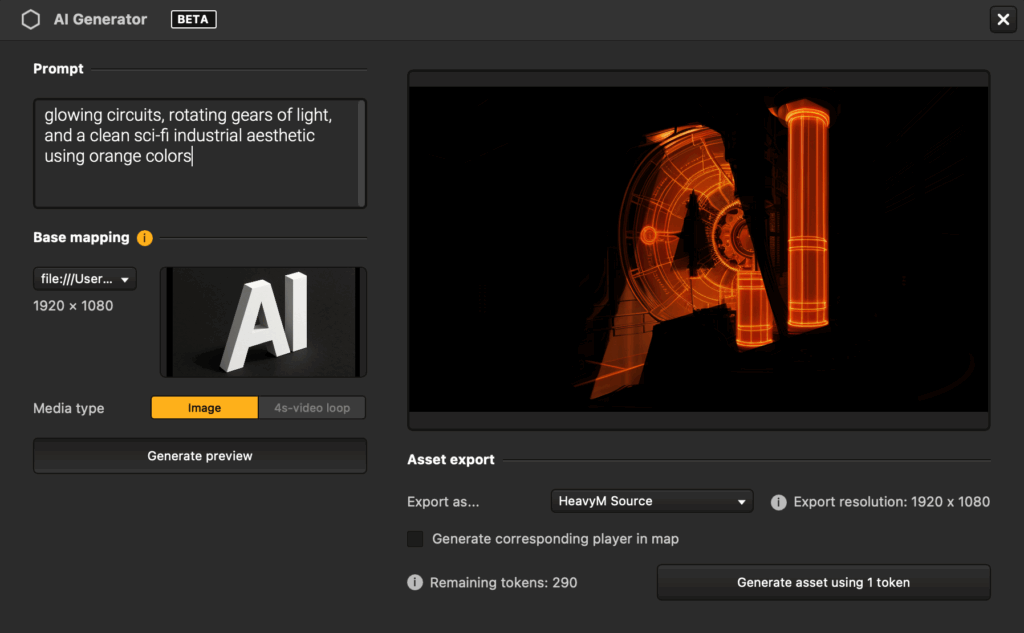
- Enter a prompt (currently in English) describing what you want to create
- Upload a reference image or use one of your maps from the HeavyM canvas
- The AI generation runs on our servers : just a few seconds for an image, under 2 minutes for a video.
- Generated videos are 4-second seamless loops, perfect for projection and animation
- An active internet connection is needed for AI generation, as all processing happens on HeavyM servers.
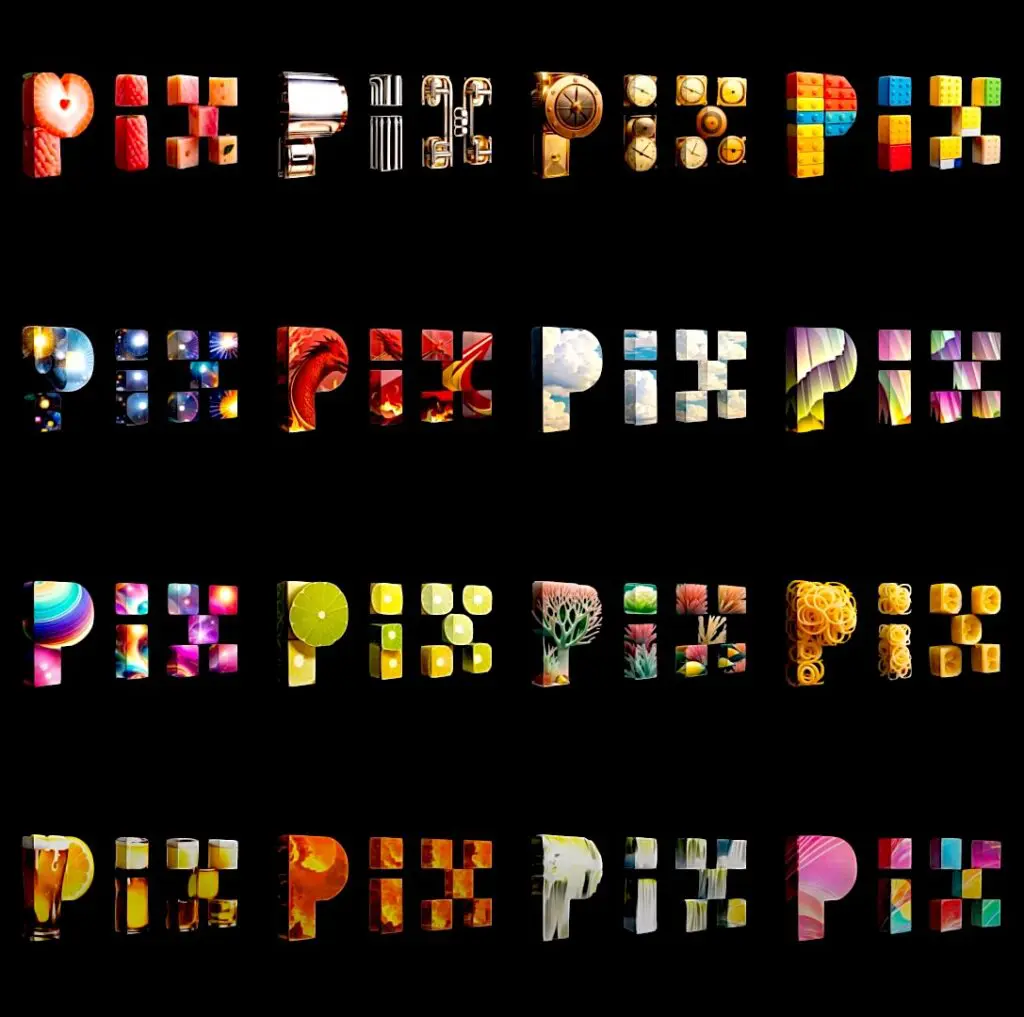
Create textures, abstract visuals, patterns, or complete scenes. All designed to blend naturally into your mappings.
Token System
AI generation in HeavyM will soon run on a token-based system.
Each image or video creation will consume a small number of tokens that you’ll be able to load directly into your HeavyM account.
This upcoming system will let you explore, experiment, and scale your creative power at your own pace.
With the token system, you will be able to:
- Generate AI visuals whenever you need them, without subscription constraints
- Control your costs easily by paying only for what you create
- Keep full flexibility: top up tokens at any time, directly in your HeavyM account
- Experiment freely without committing to large packages
New Shader Library: Master Your Assets with Ease
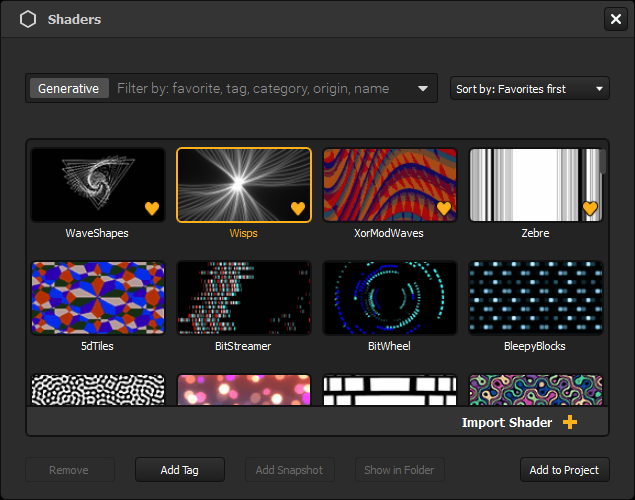
As your project grows, so does your collection of shaders. We’ve completely overhauled the Shader Library to offer an unparalleled UX, saving you precious hours during show preparation. Efficient asset management is the backbone of professional digital scenography, and these new tools make HeavyM the most organized mapping software on the market.
- Custom Tags: Categorize your shaders your way. Use tags like "Geometric," "Organic," or "Minimalist" to find exactly what you need in seconds.
- Favorites: Mark your go-to shaders with a star for instant access in the heat of a live performance.
- Advanced Filtering & Sorting: Sort by name, date, or usage. The new interface ensures that your creative flow is never interrupted by a search bar.
Multi-Stream NDI: Complex Configurations Made Simple
For our Pro and Pro+ users, HeavyM 2.15 unlocks new levels of technical flexibility with enhanced NDI support.
You can now assign an independent NDI stream to each output screen. This allows for complex multi-projector setups with different content on every surface
This feature solidifies HeavyM’s position as a professional-grade tool for complex live environments where signal routing is critical.
Auto-Save
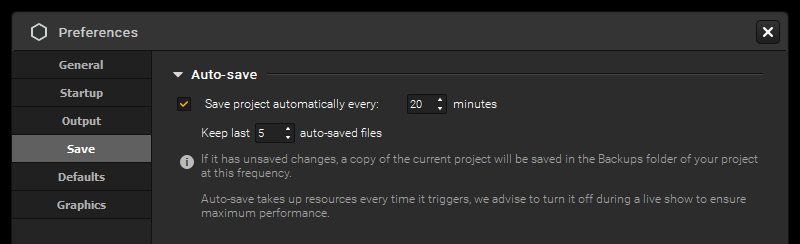
- Define how often HeavyM creates auto-saved backups
- All auto-saved files are stored directly on your computer
- Backups remain available even after closing HeavyM
- Always keep a recent version of your project, even if something goes wrong
A simple but powerful improvement that brings extra peace of mind to creators working in live contexts or on complex installations.
Full release notes
New features
- Added AI-powered content creation into HeavyM. Generate FullHD images and 4 second-video loops directly from the app. More info here. (2.15.1)
- Added NDI as a Screen destination in the Output Setup. You can now create an individual stream for each Screen, and these streams take Output warping into account. (2.15.1)
- (BETA) Added a new video-decoding library (VLC). We are in the process of implementing a new video library to decode videos, in order to increase the performances and stability of video playback on all devices. While the new library is still in Beta, you can start testing it now by changing the “video backend” in Edit -> Preferences -> Graphics -> Video decoding and then restarting HeavyM. Please be aware that it is still in Beta and not fully stable, but if you have time to test it and report the issues you encounter or, on the contrary, the improvements you notice compared to the other library (MDK), that would be very helpful to us! (2.15.1)
Bug fixes
- Fixed a crash that could occur after moving objects around in Sources panel (2.15.1)
- Fixed a crash that could occur when deleting a Folder in the Sources panel (2.15.1)
- Fixed a crash at startup that could occur when receiving lots of OSC messages while initializing (2.15.1)
- Added security in one possible case corruption of a Player shape (with warping) (2.15.1)
- Fixed the display of long Folder names in the Sources panel (2.15.1)
- Fixed the display of border of thumbnails in the Sources panel in Grid view (2.15.1)
- Fixed the display of Folders settings button in the Sources panel in List view (2.15.1)
- Fixed the display of Playlist media names in the Sources panel in Grid view (2.15.1)
- Fixed “Show extension” option in the Sources panel in List view (2.15.1)
- Fixed Playlist expand/collapse behavior in the Sources panel in List view (2.15.1)
- Fixed a missing object issue after moving it from a Playlist to the root in the Sources panel (2.15.1)
- Fixed the resync behavior of HeavyM when receiving the same BPM value via Ableton Link (2.15.1)
- Updated the DeckLink SDK (2.15.1)
- Fixed a bug that caused the whole Playlist to be deleted when deleting one of its items via the cross icon in List view in the Sources panel (2.15.2)
- Fixed a random crash in the Demo (2.15.2)
- Fixed a crash that occurred when changing the Resolution or Orientation of an NDI Stream Destination in the Output Setup (2.15.4)
- Fixed a crash that could occur when opening the Shaders Library (2.15.4)
- Fixed the display of text in the Shaders Library for all languages (2.15.4)
- Fixed an issue that caused the Light Source shader to not be available (2.15.4)
- Fixed an issue that could cause a “ghost” object to appear in List view after deleting a Playlist in the Sources Panel (2.15.4)
- Fixed a crash at startup of the in-app tutorial on Intel-only PCs (2.15.5)
- Fixed a glitch when opening certain menus (2.15.5)
- Fixed the translations of the in-app tutorial (2.15.6)
- Fixed the position of the rename popup of Folders in the Sources panel (2.15.6)
- Fixed a bug that could cause HeavyM to crash systematically at startup (2.15.7)
- Fixed a bug that could prevent shapes from being added to projects (2.15.7)
- Fixed a bug that caused some projects to get corrupted and thus marked as “not compatible with this version” in “Balanced” performance mode. (2.15.7)
- Fixed a few license activation issues: cases of incorrect unlinks and offline grace period after activation (2.15.7)
- Fixed a crash that could occur when loading a project with OSC assignments (2.15.7)
- Fixed a bug on OSC control of sliders or spinboxes. This could cause them to be momentarily stuck if the values received via OSC were outside of their range. (2.15.7)
- Fixed a bug in AI generation (2.15.7)
- Tech stuff: updated the external MIDI library (2.15.7)
- Tech stuff: updated the Blackmagic SDK for DeckLink cards and fixed a detection issue in the output (2.15.7)
- Fixed a bug in the display of the Soft Edge preview on Screens in the Output Setup module (2.15.8)
- Made changes to the Windows release authentication system, which could prevent some installation bugs (2.15.8)
- Fixed a potential blink in some transitions between Sequences (2.15.8)
- Fixed a blink that occurred in a specific mix of Color and Special group effects, while using LFOs (2.15.8)
- Fixed a bug that could cause the Welcome Window to freeze (2.15.8)
- Fixed a bug that could make the in-app tutorial end window reappear suddenly (2.15.8)
- Fixed a broken link that sent to a 404 error page in the closing window of the Demo (2.15.8)
- Fixed a small display bug in filtered view in the Shaders Library (2.15.8)
- Tech stuff: updated the external audio library (2.15.8)
Improvements
- Added an Auto-save option in Edit -> Preferences -> Save (2.15.1)
- Improved the navigation in the Shaders Library (sort & filter options, favorites, tags…) (2.15.1)
- Added an “add Folder” button to Folders in the Sources panel in List view. It adds the possibility to add a subfolder directly into a specific Folder. (2.15.1)
- Added an “add Media/Source” button to Folders and Playlist in the Sources panel in List view. It adds the possibility to add a Media/Source directly into a specific Folder/Playlist. (2.15.1)
- Added the possibility to move objects in or out of Playlists via “Move to” (right-click menu) in the Sources panel (2.15.1)
- Improved the delay and behavior of drag & drop in Grid view of the Sources panel (2.15.1)
- Changed the content of the in-app tutorial (2.15.1)
- The parameters sections in the Group Effects panels are now open by default (2.15.1)
- Added the possibility to drag & drop multimedia files directly into the currently open Folder in Grid view (2.15.2)
- Improved drag & drop behavior in Grid view of the Sources panel (2.15.2)
- Added the possibility to validate a new Folder name input via Enter (2.15.2)
- Improved the behavior when creating a new Folder in the Sources panel: selected objects are directly moved inside the newly created Folder (2.15.4)
- Added a “restart” button to GIFs in the in-app tutorial (2.15.4)
- The selected size of Sequence tiles is now saved in the global settings (2.15.6)
- Added undo/redo to Folder creation/deletion in the Sources panel (2.15.7)
- Added example projects and resources at the end of the in-app tutorial (2.15.7)
- Added undo/redo to Source or Media addition/deletion and move in the Sources Bin
- Added various improvements to the AI generation module (2.15.8)
- Fixed errors in the translations in all languages to make them more consistent with our global glossary (2.15.8)
Known issues
A crash can happen on MacOS Catalina if a screen is plugged/unplugged while an output window is already open – Please update to at least Big Sur if possible!