


Halloween projection mapping: create spooky digital displays

Samsung Halloween mapping , www.campaignlive.co.uk
Halloween is a time for spooky decorations, eerie atmospheres, and fun-filled frights. In recent years, projection mapping has become a popular method for creating unforgettable Halloween experiences. The aim of using projection mapping is to help clients achieve specific visual effects or immersive experiences on buildings and spaces. This innovative technology can turn your home, garden, or event space into a thrilling haunted house using digital decorations, video mapping, and animation to produce dynamic Halloween displays. Projection mapping is not limited to Halloween; it is also widely used for other holidays, such as Christmas, to create festive displays and enhance the holiday spirit. Whether you are decorating indoor or outdoor spaces, projection mapping offers a creative way to transform environments for various holidays. In this article, we will explore the world of Halloween projection mapping decorations, and how you can use HeavyM, Olga kits, and special Halloween video loops to create the ultimate spooky ambiance for your celebration.
What is projection mapping Halloween?
Projection mapping, also known as video mapping or spatial augmented reality, is a technique that uses projectors to display images or animations onto irregular surfaces, such as walls, buildings, or even natural landscapes. This creates immersive, three-dimensional visual experiences that can transform spaces and captivate audiences. A projection map can turn a house facade into a dynamic display, allowing for elaborate visual effects and 3D illusions using specialized software and equipment.
Projection mapping Halloween decorations involve using this technology to create eerie, atmospheric scenes and visuals that add a unique touch to traditional Halloween decorations. From ghostly apparitions and creepy crawlies to dancing skeletons and flickering jack-o’-lanterns, the possibilities are endless when it comes to creating a spine-chilling display. You can use mapping software to design a projection show, customizing animations and effects for your Halloween setup.
Here are a some inspiration sources for your Halloween projections. You can also find pre-made or customizable shows for projection mapping to suit your theme.
When mapping visuals onto your house, you can use a photo of your house in the mapping software to guide your design, ensuring accurate and personalized projection results.
Types of projection mapping Halloween decorations
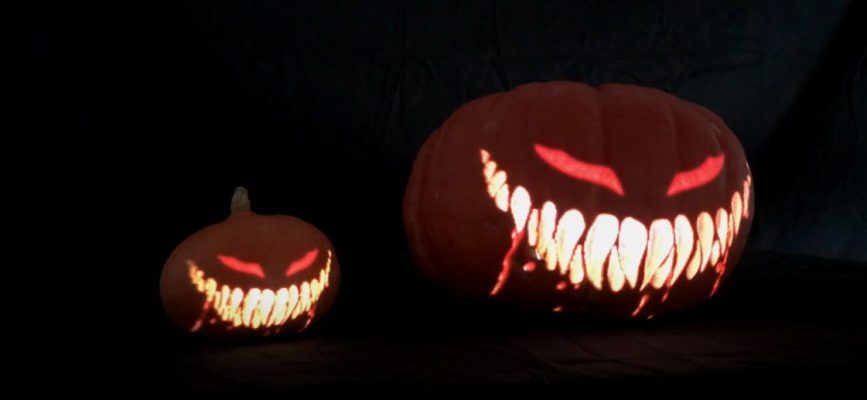
HeavyM Halloween video loops on real pumpkins
Exterior Decorations: Transform the exterior of your home or event space into a haunted house, complete with spooky silhouettes, eerie animations, and dynamic lighting effects. Projection mapping can be used to create illusions of ghosts moving in and out of windows, bats flying across the facade, or even a portal to another dimension. For an enhanced three-dimensional effect, consider placing a mannequin in your yard or on your porch and projecting animations onto it to create a lifelike, immersive scene.
Interior Decorations: Bring your indoor Halloween party to life with immersive projection mapping displays. Create a creepy forest on your walls, a swarm of spiders crawling on the ceiling, or a room filled with floating specters to give your guests an unforgettable experience.
Interactive Displays: Add an extra layer of excitement to your Halloween event by incorporating interactive elements into your projection mapping setup. Use motion sensors, touch sensors, or sound-activated triggers to create displays that respond to your guests’ actions, such as a skeleton that dances when people walk by or a pumpkin that changes expressions when touched.
Themed Spaces: If you’re hosting a themed Halloween event, projection mapping can help you create an immersive atmosphere that transports your guests to another world. Design a haunted pirate ship, a spooky graveyard, or a sinister laboratory with the help of video mapping and digital decorations.
Benefits of using projection mapping for halloween decorations
Customizable and versatile : Projection mapping allows you to create a completely personalized Halloween experience, tailored to your specific taste and preferences. The digital nature of the medium means you can easily update, modify, or change your decorations with just a few clicks.

One of our terrifying Halloween video loops
Interactive and engaging: By incorporating sensors and other interactive elements, Halloween decorations can respond to your guests’ movements, making for a truly immersive and unforgettable experience.
Easy to set up and dismantle: Unlike traditional decorations, projection mapping Halloween displays require minimal physical setup and can be easily dismantled after the event, making them an ideal choice for temporary installations and events.
Environmentally friendly: Digital decorations eliminate the need for physical materials and waste, making them a more sustainable and eco-friendly option for Halloween celebrations.
Choosing the Right Equipment for Halloween Projection Mapping
Selecting the right equipment is essential for creating a show-stopping Halloween projection mapping display. The heart of your setup is the projector—look for one with high brightness (measured in lumens) and sharp resolution to ensure your images and videos are vivid and clear, even when projecting onto large surfaces or in areas with some ambient light.
A short-throw projector is often ideal for house projection mapping, as it allows you to project large images from a shorter distance, making setup easier and more flexible. Pair your projector with a reliable media player or laptop to play your custom videos or digital decorations. You’ll also need projection mapping software, such as HeavyM, Adobe After Effects, or Final Cut Pro, to design, edit, and map your visuals to fit your chosen surface perfectly.
The surface itself plays a big role in the final effect—a light-colored, smooth wall or facade will reflect projections best, while darker or textured surfaces may require a brighter projector for optimal results. Consider the projection distance and angle to ensure your visuals fit the space and look straight and undistorted.
Don’t forget about the environment: choose equipment that’s weatherproof and durable if your display will be outdoors, and always check that your setup can withstand the elements for the duration of your Halloween show. Set a budget before you purchase, as projectors and accessories can range widely in price. With the right combination of projector, software, media player, and surface, you’ll be well on your way to creating a Halloween display that’s both eye-catching and long-lasting.
HeavyM: A powerful tool for creating projection mapping Halloween displays
HeavyM is an intuitive and user-friendly software that makes it easy for both beginners and experienced artists to create stunning projection mapping projects. With a comprehensive set of tools and features, HeavyM enables you to bring your Halloween ideas to life and transform any surface into an immersive visual experience.
Here’s how you can use HeavyM for your Halloween projection mapping:
Choose a surface: Select the surface you want to project onto, such as the exterior of your house, a garden wall, or an indoor space. Once you have decided on the surface, you can move forward with your design.
Design your visuals: Use HeavyM’s built-in visual editor to create your Halloween-themed animations and effects, or import custom content. When importing video content, make sure to respect copyright laws by using only public domain, properly licensed, or original material.
Map your projections: Align your visuals with the contours and features of your chosen surface, ensuring a seamless and realistic display.
Sync your display with music or sound effects: Enhance your Halloween atmosphere by synchronizing your visuals with spooky soundtracks or creepy sound effects.
Each stage of the projection mapping process—from choosing your surface, designing visuals, mapping projections, to syncing with audio—can increase in complexity and cost, so plan accordingly. If you want a custom-designed show tailored to your home, you can submit an outline or map of your house to receive a projection show that fits your specific display.
Olga kits and special Halloween video loops
To elevate your projection mapping Halloween decorations even further, consider using Olga kits. For larger displays or houses, you may need a longer projection distance or even multiple projectors to achieve the desired image size and brightness.
Special Halloween video loops offered by HeavyM can make your visuals truly stand out. High contrast in these video loops is especially important, as it enhances image clarity and color depth, making the visuals pop in dark environments.
Olga kits

Olga kits are modular projection mapping structures designed to simplify the process of creating stunning, three-dimensional visuals. These kits come in various shapes and sizes, providing an easy and creative way to add depth and dimension to your Halloween display.
Halloween video loops

In addition to the software, HeavyM also offers a library of ready-to-use video loops specifically designed for Halloween celebrations. These loops can be easily integrated into your projection mapping project, saving you time and effort while still delivering a professional and captivating visual experience.

Our Halloween Video Loops on Olga kits
Halloween Display Ideas: Spooky Scenes and Creative Concepts
When it comes to Halloween projection mapping, the only limit is your imagination. You can create everything from simple, spooky effects to elaborate, interactive haunted house experiences that will leave your guests in awe.
For a classic haunted house vibe, project ghostly apparitions, flickering lights, and creepy crawlies onto the facade of your home. Transform your yard into a ghostly graveyard with projections of tombstones, wandering spirits, and swirling mist. Or, bring a spooky forest to life with animated trees, lurking shadows, and glowing eyes peering from the darkness.
Add a playful twist by projecting Halloween-themed characters like witches, skeletons, and dancing pumpkins onto your house or garage. Combine projections with physical decorations—such as cobwebs, mannequins, and strings of lights—to create a multi-layered, immersive scene.
For an interactive touch, set up effects that respond to your guests’ movements or sounds, like a ghost that appears to follow visitors as they walk by or a skeleton that dances when someone claps. Customize your display to fit your favorite Halloween themes, whether you’re inspired by classic movies like Hocus Pocus or want to pay tribute to the haunted streets of Salem.
Don’t forget to share your projection mapping project with friends, family, and the wider Halloween community—social media is full of inspiration and tips from fellow enthusiasts. With projection mapping, you can turn your house into the talk of the town and create a Halloween display that’s truly unforgettable.
Tips for a successful projection mapping Halloween display
Test your setup beforehand: Before your event, test your projection mapping setup to ensure everything is working as intended. This will give you the opportunity to troubleshoot any issues and make any necessary adjustments.
Choose the right projector: For a high-quality display, it’s essential to choose a projector with the appropriate brightness and resolution for your specific environment. Consider factors such as ambient light, projection distance, and surface size when selecting a projector.
Use high-quality content: The quality of your visuals is crucial for a captivating projection mapping experience. Ensure you’re using high-resolution images and animations to create a polished and professional display. You can find free stock footage and try free trial versions of projection mapping software to keep costs down. YouTube is also a valuable resource for discovering tutorials, green screen footage, and stock videos to enhance your project.
Consider the viewing angle: When designing your projection mapping Halloween decorations, keep in mind the viewing angle of your audience. Make sure your visuals are visible and impactful from various perspectives.
Ready to take your display to the next level? Connect with our community or explore additional resources for more tips and support.
Conclusion
Projection mapping is an innovative and engaging way to elevate your Halloween decorations, creating a unique and unforgettable experience for your guests. By utilizing HeavyM software, Olga kits, and special Halloween video loops, you can transform any space into a spine-chilling haunted house or immersive themed environment. With endless possibilities for customization and interactivity, projection mapping is a cutting-edge approach to Halloween celebrations that will leave a lasting impression on all who experience it.
