

Heads-up: HeavyM 2.16 drops support for older operating systems. It now requires Windows 10 (64-bit) or later, or macOS 12 Monterey or later.
What's new?
Native Apple Silicon Support
HeavyM now runs natively on Apple Silicon Macs (M1, M2, M3, M4…), without going through Rosetta.
- A dedicated ARM64 build of HeavyM for macOS
- The update system automatically delivers the right build for your Mac
- If you are still running the Intel build on an Apple Silicon Mac, HeavyM suggests switching to the native version

VLC, the New Default Video Engine
The VLC video library, introduced in Beta in 2.15, is now the default video backend on all platforms, for better performance and stability of video playback.
- Hardware decoding can be enabled or disabled per video in the Source settings, and the video reloads instantly
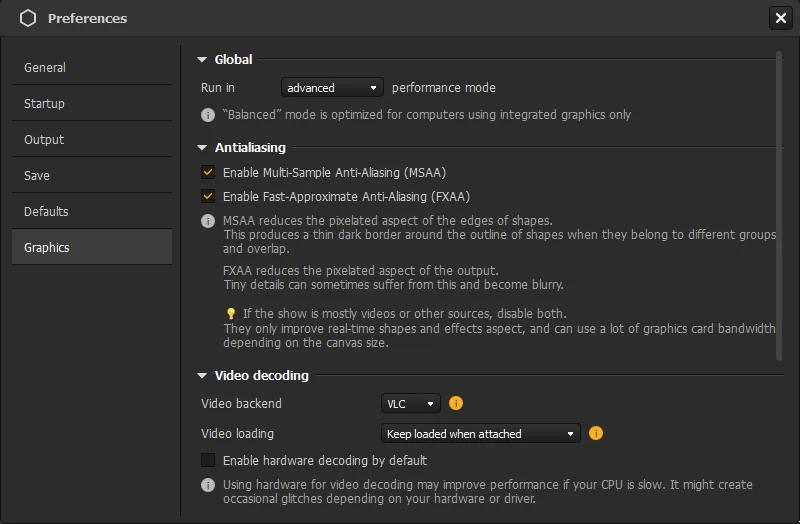
- The default for new videos is set in Edit -> Preferences -> Graphics -> Video decoding
- New "Video loading" option: Always loaded, Keep loaded when attached, or Unload when not displayed
- Many optimizations for high-resolution HAP files, for smoother playback of large videos
- Reworked video export, now based on the new video engine
Web Sources
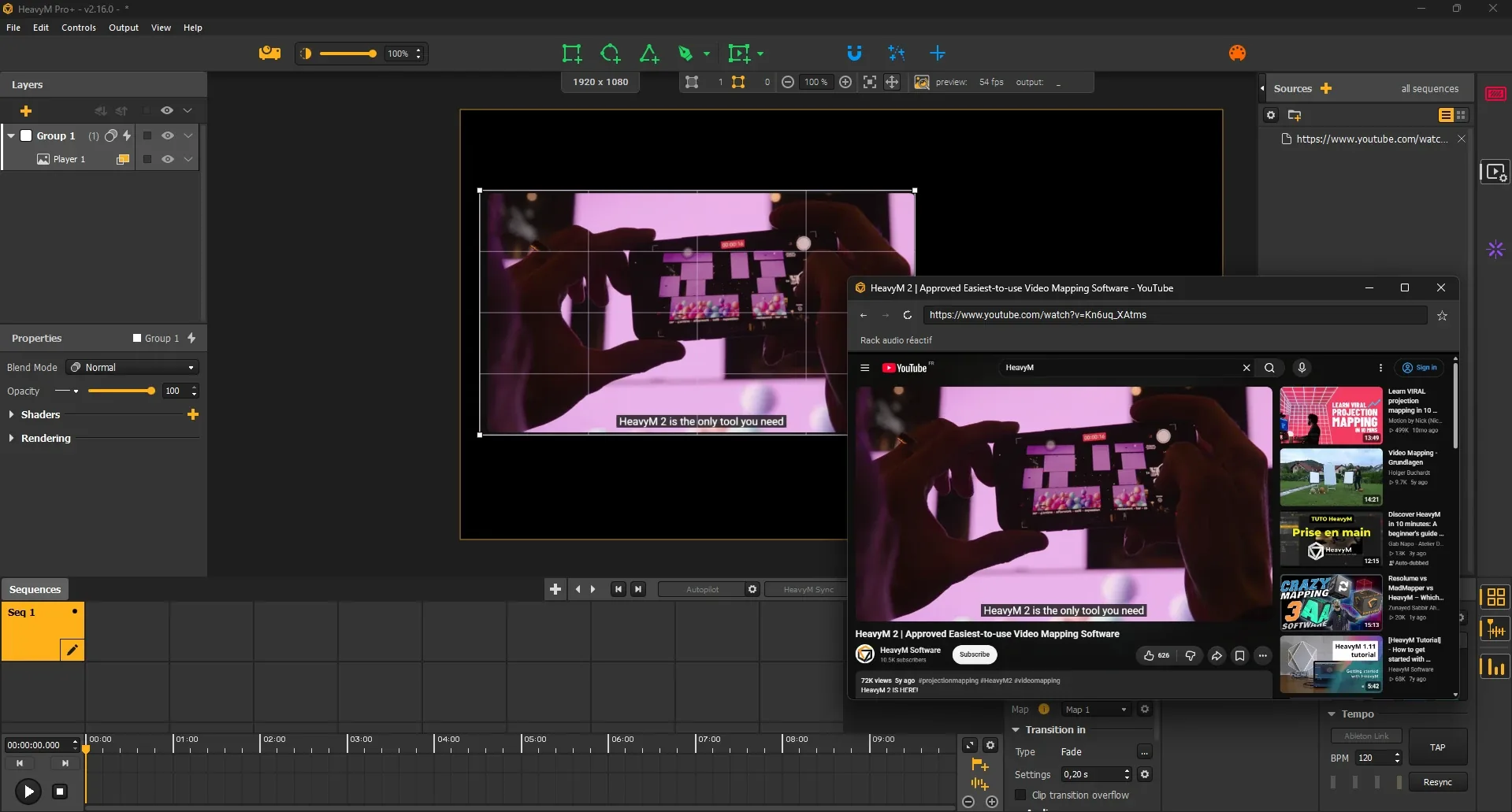
Display any web page as a Source in HeavyM: dashboards, web animations, live data, online players…
- Add a "Web" source from the Sources panel and enter a URL
- Choose the resolution and volume of the page, and save bookmarks
- Open the browser interface to interact with the page while it is mapped
- Choose what happens when the page is not displayed: keep alive, keep alive (muted), or unload
54 New Shaders
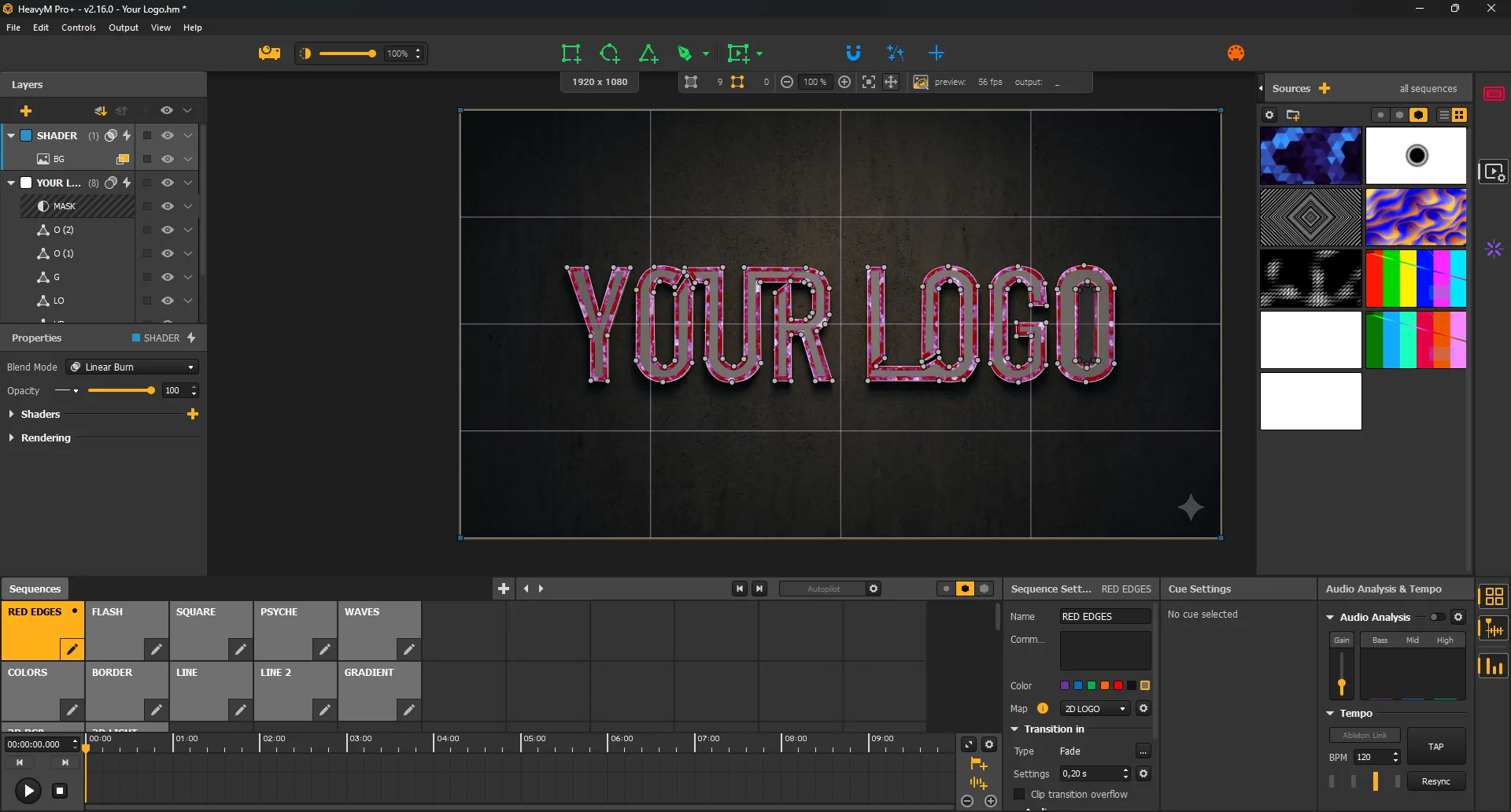
Three new collections join the shader library: 42 shaders by Bruce Lane, 10 audio-reactive shaders by VAFEC and two keying shaders.
42 shaders by Bruce Lane













10 audio-reactive shaders by VAFEC
Moving heads, lasers, fireworks, lava caves, confetti, Christmas lights… These shaders react to the bass of your music and keep moving on their own when there is no audio. Many of them keep a pure black background, made for facades, shop windows and stage sets.










Color Key and Luma Key
Two new keying shaders remove a color or a luminance range from your content, on shapes and on groups.
NetSync: Synchronize Several Machines
Pro+ users can now synchronize several HeavyM machines on the same network, for installations spread across many projectors and computers.
- Sequences and playback stay in sync across machines
- Choose which machine leads
- Enable sync and leadership at startup in Edit -> Preferences -> Startup
- Video Sync Groups are also kept in step across machines
A Smoother, Faster Interface
Many panels and windows have been rebuilt for a cleaner, more responsive experience: Effects, Controls, Preferences, Home page, Shortcuts, in-app tutorial and more.
- New Output and Interface frame rate targets, in Edit -> Preferences -> Graphics
- Smoother output: the canvas preview automatically slows down when the projection lags behind its target
- A warning appears when the output is below its frame rate target, with tips to improve it
Multi-Selection in Sources and Sequencer
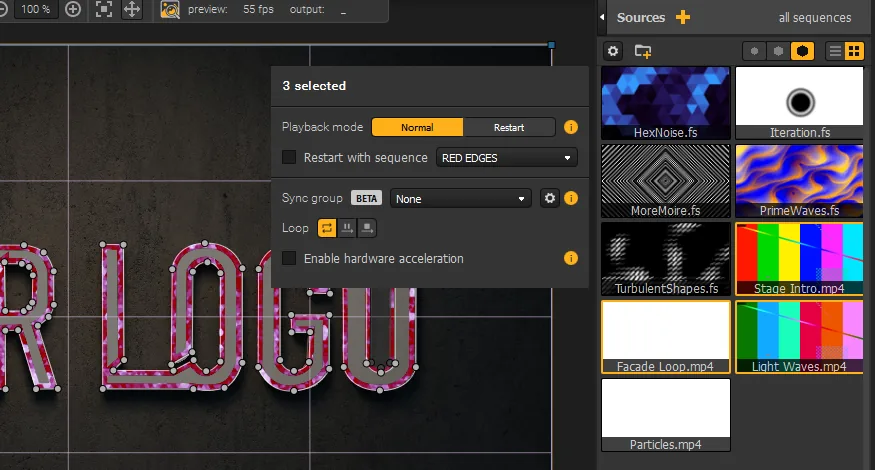
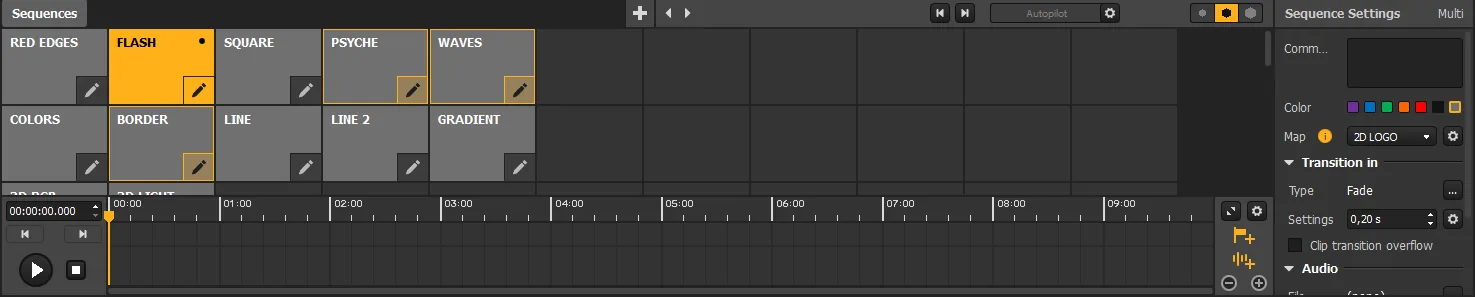
The Source settings panel has been completely rebuilt, and you can now select several sources and edit them all at once. When the values differ, the field shows "Mixed".
- Edit speed, volume, loop mode, playback mode or hardware decoding on many videos at once
- The file name of the media is now shown in the panel
- Multi-selection is also available in the Sequencer
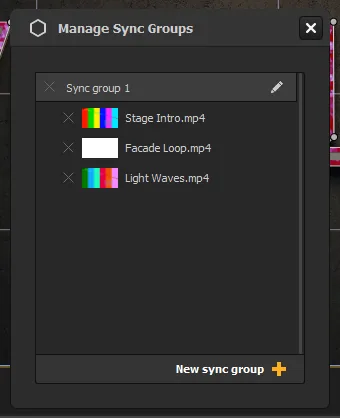
Video Sync Groups
Keep several videos perfectly in step, frame for frame. Ideal to display several copies of a clip, or separate videos that have to show the same moment.
- Play, pause, seek, speed, loop, In/Out points and playback mode applied to one video apply to the whole group
- Synced videos can be different files, shown in different places, each with its own volume
- A leader is chosen automatically, or pick it yourself with "Sync leader"
- Manage all your groups from the "Manage Sync Groups" window
Support Report
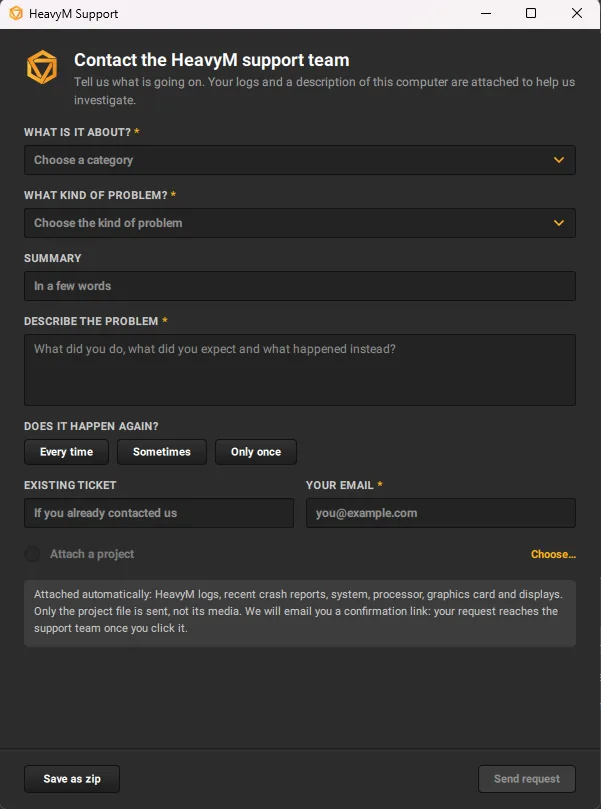
When something goes wrong, help us help you. Open Help -> Contact Support… (or the crash popup after an unexpected close) to reach the new Support Report tool.
- Describe the problem, its category and how often it happens
- Your HeavyM logs, recent crash reports and a description of your computer are attached automatically
- Optionally attach your project file (without its media)
- Send the request directly to our support team, or save everything as a zip file
La note de release complète
Les nouvelles fonctionnalités
- Added native support for Apple Silicon Macs (ARM64). HeavyM no longer needs Rosetta on M1/M2/M3/M4 Macs: the update system automatically delivers the right build, and a popup suggests switching to the native build if you are running the Intel build on an Apple Silicon Mac. (2.16.0)
- VLC is now the default video backend. The new video-decoding library introduced in Beta in 2.15 is now used by default on all platforms, for better performance and stability of video playback. (2.16.0)
- (BETA) Added Video Sync Groups. Videos in a Sync Group follow the same timestamp: play, pause, seek, speed, loop, In/Out points and playback mode applied to one of them apply to the whole group. A leader is chosen automatically, or you can pick it with "Sync leader". Groups are managed in the "Manage Sync Groups" window. (2.16.0)
- Added Web sources. You can now display a web page as a Source: enter a URL, choose the resolution and volume, save bookmarks, interact with the page through the browser interface, and choose what happens when it is not displayed (keep alive, keep alive muted, or unload). (2.16.0)
- Added NetSync for Pro+ licenses. You can now synchronize several HeavyM machines on the same network, choose which one leads, and enable sync at startup in Edit -> Preferences -> Startup. (2.16.0)
- Added 42 new shaders by Bruce Lane (2.16.0)
- Added 10 audio-reactive shaders by VAFEC (2.16.0)
- Added the Color Key and Luma Key shaders, for shapes and for groups (2.16.0)
- Added a new Source settings panel, with the possibility to select and edit several sources at once (2.16.0)
- Added multi-selection in the Sequencer (2.16.0)
- Added Output and Interface frame rate targets in Edit -> Preferences -> Graphics (2.16.0)
- Added a "Video loading" option in Edit -> Preferences -> Graphics, to choose between instant display of videos and lower video memory usage (Always loaded / Keep loaded when attached / Unload when not displayed) (2.16.0)
- Added the HeavyM Support Report tool. From the crash popup or via Help -> Contact Support…, it gathers your logs, crash reports and a description of your machine, and sends them to our help center or saves them as a zip file. (2.16.0)
- Added many new endpoints to the OSC API: Sources management (add, delete, info, assign to a Player by ID or index, unassign), video play range, speed and volume, opacity and displayed properties, Sequences and tabs, timeline info, Autopilot info, items and groups info. Errors are now reported in structured replies. More info in the OSC API documentation. (2.16.0)
- Added a TouchOSC template for video settings (2.16.0)
Corrections de bugs
- Fixed a crash that could occur when a shader was reloaded (2.16.0)
- Fixed a crash that could occur when unplugging a screen, and other screen plug/unplug issues (2.16.0)
- Fixed a crash that could occur when refreshing the resolutions of a camera stream in the camera settings (2.16.0)
- Fixed a crash that could occur when a Player was disconnected during a soft closure (2.16.0)
- Fixed a crash that occurred when adding an audio track to the timeline (2.16.0)
- Fixed a crash that could occur when creating a Playlist from multiple sources (2.16.0)
- Fixed a crash that could occur when undoing a Source setting after switching the Sources view (2.16.0)
- Fixed a crash that could occur when receiving some OSC messages (2.16.0)
- Fixed a crash that occurred when adding a Source via OSC into a partially existing folder path (2.16.0)
- Fixed a crash caused by an infinite loop between "Jump to" cues (2.16.0)
- Fixed a crash related to missing media (2.16.0)
- Fixed a freeze that could occur when deleting a cue (2.16.0)
- Fixed several crashes and freezes when closing HeavyM (2.16.0)
- Fixed a freeze when unplugging a DeckLink output or switching DeckLink devices (2.16.0)
- Fixed crashes of DeckLink inputs with a missing device or failing driver calls (2.16.0)
- Fixed a bug that prevented DeckLink devices from being detected again after HeavyM was closed abnormally (2.16.0)
- Fixed a display corruption that could occur when using multiple DeckLink inputs (2.16.0)
- Fixed a bug that caused DeckLink outputs to stay inactive when the card refused the ARGB format: they now fall back to YUV (2.16.0)
- Fixed a bug that could cause Sources to disappear from Players (2.16.0)
- Fixed moving a Playlist item to the root of the Sources panel in Grid view (2.16.0)
- Fixed consecutive drag & drops of a Source in a Playlist (2.16.0)
- Fixed Ctrl+click deselection in the Sources panel in Grid view (2.16.0)
- Fixed the display of thumbnails, including the fallback thumbnail (2.16.0)
- Fixed a bug that caused the sound of a Source to come back after undoing its deletion (2.16.0)
- Fixed the enabling/disabling of hardware decoding on videos (2.16.0)
- Fixed the undo of the font choice of a Text source after the hover preview (2.16.0)
- Fixed the display of the missing media popup and of long texts in the project loading popup (2.16.0)
- Fixed a bug on Players with overlapping points (2.16.0)
- Fixed the display of the Soft Edge preview in the Output Setup module (2.16.0)
- Fixed a bug that caused Player Soft Edge values to be reset when edited (2.16.0)
- Fixed the magnet in the Output Setup module (2.16.0)
- Fixed the selection of the resolution in the Output Setup module (2.16.0)
- Fixed the rotation direction of the display identifier (2.16.0)
- Fixed blending in the projection (2.16.0)
- Fixed the projection window on macOS (2.16.0)
- Fixed canvas shortcuts (2.16.0)
- Fixed right-click submenus not reopening in the canvas and in the Sequencer (2.16.0)
- Fixed FXAA and MSAA settings not being applied correctly at startup (2.16.0)
- Fixed the canvas preview at startup (2.16.0)
- Fixed the Swipe global effect (2.16.0)
- Fixed the continuity of the Noise LFO and prevented it from returning negative values (2.16.0)
- Fixed the update of Custom Centers and the input of values in spin boxes (2.16.0)
- Fixed the rounding of angle controls (2.16.0)
- Fixed the input of numbers with some system languages (thousands separator) (2.16.0)
- Fixed a bug that caused Presets to be saved in a folder with the wrong shader name (2.16.0)
- Fixed a lag when scrolling the Controls list (2.16.0)
- Fixed audio file assignments when the file path was unchanged (2.16.0)
- Fixed the Autopilot not advancing when started without a displayed Sequence (2.16.0)
- Fixed a lag of the Sequence preview while dragging it (2.16.0)
- Fixed the width of the timeline settings popup (2.16.0)
- Fixed the color of the timeline play button (2.16.0)
- Fixed the hovering of the main menu on macOS (2.16.0)
- Fixed the size of the menu bar (2.16.0)
- Fixed the keyboard focus in the Shader dialog (2.16.0)
- Fixed the "Rate your experience" popup (2.16.0)
- Fixed the size of various popups and windows (2.16.0)
- Tech stuff: made changes to the Windows installer, which now removes the previous version before installing. This could prevent some installation bugs. (2.16.0)
- Tech stuff: updated the external MIDI library, fixing a crash that could occur when closing a MIDI port on Windows (2.16.0)
- Tech stuff: updated the VLC video library, Spout and the update system (Sparkle / WinSparkle) (2.16.0)
Améliorations
- Rebuilt the Effects panel, Controls panel, Preferences, Home page, Shortcuts window, Background settings, in-app tutorial, Activation window and About window (2.16.0)
- Improved rendering pacing for a smoother output. The canvas preview now automatically slows down when the projection lags behind its target, with a visual feedback in the canvas. (2.16.0)
- Added a warning when the output is below its frame rate target, with suggestions to improve it (2.16.0)
- Improved the synchronization of multiple outputs on Windows, macOS and Vulkan (2.16.0)
- Reduced video memory usage when MSAA is disabled (up to 1.3 GB in 4K) (2.16.0)
- Reorganized the Graphics preferences (Antialiasing, Video decoding, Refresh rates) with performance tips (2.16.0)
- Made many optimizations for the playback of high-resolution HAP files (2.16.0)
- Improved video export, now based on the new video library (2.16.0)
- Hardware decoding can now be enabled or disabled per video and is applied instantly, without restarting HeavyM. The option previously called "Hardware acceleration" is now called "Hardware decoding". (2.16.0)
- Added the file name of the media in the Source settings panel (2.16.0)
- Video speed and volume are now applied while dragging their sliders (2.16.0)
- The Rewind button now restarts the video (2.16.0)
- Playlist videos are now stopped instead of paused when leaving them (2.16.0)
- The minimum duration of a Source is now 1 second (2.16.0)
- One text alignment button now always stays checked (2.16.0)
- Added undo/redo to Source additions (files, cameras, Spout/Syphon, DeckLink, NDI, Text and Web sources), Playlist creation and moves between Folders and Playlists in the Sources panel. Dropping files on a Player in the canvas is now a single undo step. (2.16.0)
- Added a quick access to AI generation in the "Add source" menu (2.16.0)
- Reordered the main menu (2.16.0)
- Main window toggle buttons no longer keep the keyboard focus (2.16.0)
Get HeavyM 2.16
Download the new version from your License Manager.
The new version will be available from your License Manager on release day.
Coming mid-November Go to my License Manager