

视频映射中的连接与信号传输
简而言之
为了确保投影映射系统的稳定运行,必须选择合适的视频连接方式。虽然HDMI是短距离传输的标准接口,但在长距离布线的情况下,专业系统通常采用SDI或HDBaseT。合理管理显示频率并了解EDID/HDCP,可确保从映射软件到投影仪的信号传输流畅无瑕、无闪烁。.
常见的视频线缆和连接器
- HDMI(高清多媒体接口): 这是传输未压缩数字音频和视频数据时应用最广泛的标准。它被广泛应用于大多数家用设备中,例如电视机、游戏机、计算机以及DVD/蓝光播放器。.
- DVI(数字视频接口): 这是一种比HDMI更早出现的视频接口,主要用于连接电脑显示器。它同时支持数字和模拟视频信号,不过如今模拟视频的使用已不常见。.
- VGA(视频图形阵列): 这是一种较早的模拟标准,通常用于计算机显示器和投影仪。尽管在新设备上已越来越少见,但在许多老旧设备上仍能见到。.
- DisplayPort 或 Mini DisplayPort: 这是一种既能传输音频信号又能传输视频信号的数字接口。它常用于连接计算机和显示器,尤其适用于高分辨率显示器。.
- USB-C: 虽然主要用于传输数据和供电,但它也可以通过DisplayPort或HDMI的替代模式传输视频信号。在新款笔记本电脑和智能手机上,这种接口正变得越来越普遍。.
其他技术
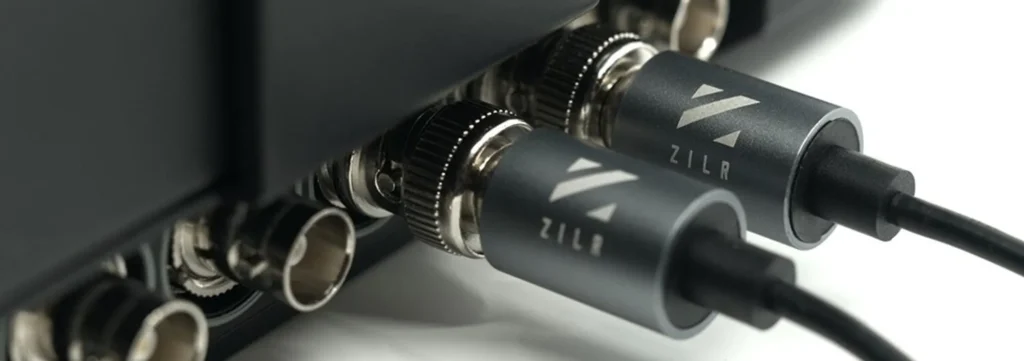
- SDI(串行数字接口): 这是用于传输未压缩数字视频的专业标准。该标准主要应用于视频制作和广播环境,例如电视演播室。.
- HDBaseT: 这是一种相对较新的标准,允许通过单根长度不超过100米的CAT5e/6电缆传输未压缩的高质量视频、音频、以太网信号、控制信号,甚至电力。该标准主要应用于专业领域,例如音视频系统安装和会议室。.
- NDI (网络设备接口)是专业视频广播领域的一项创新标准。. 由 NewTek 开发,, 它支持通过本地以太网传输高质量视频。此外,, NDI 支持 4K 视频,, 使其成为一个 播放高分辨率视频的理想解决方案。. 它还能够通过单根以太网电缆传输多个视频流,从而大大简化了视频制作环境中的布线基础设施。.
视频流同步
在一篇 视频映射设置 使用由多台机器管理的大量投影仪,, 视频流的失步可能会造成严重问题。.
当各种视频源在时间上未能完全对齐时,就会发生这种不同步现象,从而导致视觉效果不一致且令人分心。例如,如果一段动画本应流畅地在多台投影仪之间移动,, 不同步可能会导致一个投影仪上的动画播放超前,而另一个投影仪上的动画播放滞后。. 当使用多台计算机控制投影仪时,这一问题可能会加剧,因为每台计算机的性能水平可能略有不同,从而导致处理和显示时间存在细微差异。.
此外,网络延迟、视频处理速度的差异以及投影仪响应时间的差异 这些因素都可能导致不同步。. 为解决这一问题,必须使用能够精确同步多台设备和投影仪之间视频流的软件或硬件,这通常需要具备高水平的技术专长并进行细致的设置。.
继续
本指南由……编写 HeavyM, ,这是一家自2013年起专注于视频投影映射的公司。.
如有任何问题、意见、建议等,请使用此联系表单: https://help.heavym.net/hc/requests/new. 保证在24小时内回复。.
常见问题(FAQ)
哪种线缆最适合投影映射?
对于短距离(15米以内)传输,标准的HDMI 2.0或DisplayPort线缆是理想选择。 对于需要50至100米布线的大型场馆,专业人士会使用同轴SDI(3G/12G)、HDBaseT(以太网传输)或有源光纤HDMI线缆,以防止信号丢失。.
在视频投影中,什么是EDID?
EDID(扩展显示识别数据)是投影仪发送给计算机的数字身份信息表。其中包含支持的分辨率和刷新率。为避免 EDID 信号中断,请务必先打开投影仪和信号延长器的电源,然后再开启计算机并启动映射软件。.
如何解决HDCP黑屏问题?
HDCP 是一种数字版权保护协议。如果投影仪显示黑色、蓝色或闪烁的屏幕,则很可能是发生了 HDCP 阻塞。要解决此问题,请确保使用未受保护的本地媒体文件以及符合 HDCP 标准的专业级分路器,而非消费级流媒体盒。.
为什么用相机录制时,投影画面上会出现滚动条?
当投影仪的显示频率(例如 50Hz 或 60Hz)与相机的快门速度不匹配时,就会出现这种情况。为避免闪烁和滚动条纹,必须使整个技术链的刷新率保持一致:包括计算机输出、投影仪以及相机设置。.